Posts

Knowing when it's time to move on

Someone contacted me a year or so ago very fed up with her admin position.  She was wondering how she could make her job more interesting.  She was also having relationship problems with her colleagues.  I could feel her frustration. I found her email the other day so thought I would contact her just to see how she was faring and things have not gotten any better. My gauge to go is when the joy is gone.  I like to have a job where I have fun and can feel satisfied when I've done a good job.  I also want to feel challenged and feel a sense of accomplishment when I have figured something out.  When I stop having that, I just go through the motions and that is never good. There is always economics though and the need to earn a living so that has to be taken into consideration.  Can I afford to move on? Sometimes there are opportunities in your own back yard that you can try.  A new boss, a new set of tasks and new work colleagues....

Minute-Taking Coach

I am one of those rare birds who actually enjoys taking minutes, although I avoided taking them for years.  I wouldn't apply for a job if I saw that minute taking was a requirement and if an employer ever suggested it, I threatened I would quit.  However, when I finally decided to try it, I found I really liked it.  I enjoy the preparation leading up to the meeting, the actual taking of the minutes and the follow up afterwards.  I particularly like senior executive meetings. So how did I get into it?  In 2007, I started this blog and wrote articles on various subjects of interest to an administrative assistant.  I had never written on minute taking though and knew that was probably something people would want to hear about.  So I bugged and bugged a friend of mine who was a Senior Executive Assistant and experienced minute taker to explain it all to me.  After listening to her, I realized that once I knew th...

Working with an Assistant

I was speaking with a senior Executive at my office today and she said one of the most valuable things that she has learnt over the years was how to work with an assistant.  I think when we are first in the workforce we are going to the office expecting our boss will tell us what to do and we will endeavour to do it according to our skill set.  However, there comes a time as we gain experience, that we will want to show our bosses what we can do and how we can help them.  Here is a good article on that subject.  Knowing how to work with your assistant is critical to your success and theirs: http://executivesecretary.com/training-an-executive-new-to-working-with-an-assistant/ I also wrote another article on this subject, which I thought would be useful for this discussion: https://secretaryhelpline.blogspot.com/2008/04/teaching-your-boss-to-be-boss.html

On to the next task...

The way I work is to get things off my plate as soon as possible and move on to the next task.  The problem is it is now filed in the back burner of my mind.  It is still hovering in the background somewhere, but I've completed the work, done whatever I needed to do with it and diarized whatever needed to be diarized and moved on until I need to know it again.  My boss may come out a month or so later and ask me questions about it and sometimes my mind initially draws a blank.  I need a minute to go back and check and then I am completely up to speed again. I find with the volume of work admins deal with throughout the day, week and month, we need some system to keep things straight.  For me, the thing that helps is to document everything .  I put items in my calendar as a reminder, but the problem with calendar reminders is unless you know which day you put it on or what you named it, you can't easily find it....

Introducing Boomerang Virtual Assistants

I finally launched my new website and am open for business.  If you want to take a peek here is my URL address Boomerangvirtualassistants.com It's very exciting!  Sometimes you just have to do it and quit trying to figure everything out.  My esthetician, who opened her own shop about a year ago, said she is learning the business side as she goes.  Of course you need to know the basics, but some things you really do learn on the go.  I have the right resources to help me along: a bookkeeper to handle that part of the business.  My website is hosted on another platform so I have the security of being under someone else's umbrella and they have to do all the security work.  I bought a new computer and subscribed to a plan for IT support so I have an IT person at my beck and call.  I upgraded to the professional package offered by Dropbox so I can receive documents and recordings (I was already running out of space).  So I thi...

Having an assistant

Recently, my sister (a long-time assistant) retired.  We were doing some work together and because she knew how busy I was at my day job, she immediately took over and started to do the small tasks she knew I didn't have time to do.  I appreciated all over again how nice it can be to have an assistant, and not only an assistant, but a very experienced one.  I didn't have to worry about a thing because I knew she was taking care of it.  It took a real burden off my shoulders.  Unfortunately, this arrangement will be short lived, but it did remind me again how important our role can be. I have also seen what it is like when it doesn't work.  If a boss and their admin are not communicating expectations, that can create more work for both of them.  It is important that you both know what the other does and where the assistant can take over and the boss can leave it.  This way it can work beautifully. For instance, I have a flagging system with my...

Trouble in the office

I always enjoy Anita's insights.  This is a good read on ways to handle passive/aggressive colleagues .

Virtual Assistance: What a way to work!

I have recently been doing some online work and it has opened up a whole new world for me.  Of course others have been on the bandwagon for some time and are doing quite well.  What do they know that I don't and why have I not moved on this before now? Striking out on your own can be frightening.  Especially when you are used to the traditional workplace of going to an office, getting a steady paycheck, being on the company pension and benefit plan, etc.  There are definitely things to consider, but the opportunities can be limitless. I always thought the ideal situation would be if you had two incomes, as in a spousal relationship.  Then if the other partner had a 9 to 5 job with all the trimmings, striking out on your own would not be as risky.  But what if you are on your own like I am?  I think I just answered my own question about being an entrepreneur.  The definition of an ent...

Meeting with your Boss

It is always good to be prepared when meeting with your boss.  The purpose of the meeting should be to ask questions, get direction, provide and/or receive information. I would suggest the following: If you have access to your boss's email Inbox, go through it as that will be a good place to start.  As you go through the items, you will have questions about meetings he or she is attending, questions about events they may or not be attending, etc.  Also check their Sent items in case the answer lies in there.  Sometimes I have checked the Sent items to see my boss has already emailed the organizer to send her regrets to a meeting. Review the items you want to discuss before the meeting with your boss.  Sometimes you may have a list of items, but don't get to see your boss face-to-face for a few days.  It is better if you go in prepared.  It will be a better use of both your time.  You do not have to spend a lot of time reviewing, but...

Viewing Gridlines in a Table in Word

Image
When I create a table in Word I like to see the gridlines (the faint lines that tell you there is a line there, but if you print the document you won't see any lines).  I like this especially for minute taking as I use a minute template with tables.  I prefer creating it this way because I don't want to be fussing with formatting while in a meeting.  The end product will look like it is one area on the document, but really it is many rows of cells.  By doing this it makes it easy to jump from cell to cell.  Setting the gridlines is done by clicking on the View Gridlines button under the Layout Tab, which is in the Table area (located at the bottom on the ribbon).  See screenshot below: This is a toggle button so once you set it, it will be on for all your documents, which is what you probably want if you like this feature.  To take it off you just click on it and then it will return to having no gridlines. I go through this every time I chang...

Why I left Google to join Grab

I've officially switched from Blogger to Medium.  See you over  there !

Who or Whom?

An easy way to remember when to use who or whom: If you can replace the word with �he� or �she,� use who . If you can replace it with �him� or �her,� use whom . See some examples at this link: https://www.grammarly.com/blog/who-vs-whom-its-not-as-complicated-as-you-might-think/

Why Kotlin Is Better Than Whatever Dumb Language You're Using

Image
Ah, clickbait.  Where would the internet be without it?  The answer will shock you! But seriously, I didn't mean to insult your favorite language� much.  After all, your language of choice is probably getting better at a glacial pace.  Right?  If your language isn't dead, then it's gradually getting better as they release updates to it. How slowly, though?  Well... If the language you're using happens to be Java, then you've no doubt realized that by the time Java becomes a really good language, you'll be dead.  Loooong dead.  I know we don't like to contemplate our own mortality, but when you plot the trajectory of Java from its birth 20+ years ago to its full knee and hip replacement with Java 8, you can't help but wonder, "Am I going to be stuck with this for literally the rest of my life? What if this is as good as it gets?" Anyhoo, I ran across the old language question again because I finally tried my hand at Android development.  I hav...

Looking the Part

I attended an event today on minute taking.  Our organization set it up for Admin Professionals' Week.  Unfortunately, my first impression of the speaker was not very good because she was dressed down and looked rather frumpy.  I don't believe in judging a book by its cover, but I was amazed at how easily my mind went there and how I equated how she looked to what she had to say.  I was happy that my first impression had been wrong.  The presentation had all the key aspects of basic minute taking, and because that was her audience, it was helpful and informative to the group.  I appreciated the work the speaker had put into the presentation and the fact she made herself available to our group.  She was however a paid speaker so I would have expected more.  This incident today just reinforced to me again that whether we like it or not, how we present ourselves really does make a difference in how we...

Reading Other People's Minutes

It is important to read other people's minutes.  Especially from meetings that your boss may have something to do with.  It can be beneficial for a number of reasons: It will give you a broader idea of what your boss is involved in and will help you assist him or her better; It will help you understand the business better, which will help you in taking your own minutes; It can give you pointers on how to minute better by looking at how they worded a sentence or handled a discussion.  You can use some of the words they used.  Whenever I learn a new word or phrase, I add it to my list and if I'm ever stuck, I go back to the list and choose something appropriate; It will also give you good tips on what not to do.  Many times I have read minutes and there was a lot of he said/she said in it, or it was so point form it didn't make a lot of sense.  Looking at it as an outsider helped me to see how that was not the best way to record ...

Annotated Agenda

It is very useful to prepare an annotated agenda when going into a meeting.  For those who have never used one (or heard of it), it is simply an agenda with notes on it.   For the agenda that I send to the meeting participants, I annotate it to let them know why an item is on the agenda or if there are any attachments.  In my example below you will see that I put brackets around the notes and italicize them.   Call to Order: 1.  Adoption of Agenda (Motion Required) 2.  Approval of Previous Minutes of December 25, 2016 (Attached) (Motion Required) 3.  ABC Matter (Deferred from November meeting) (For Discussion) 4.  Staff Communications (15 minutes to discuss any concerns from staff) For the agenda for the Chair and myself, I prepare it as above, but with cheat notes so he will not forget some points he wants to make or that I want to remind him to bring up.  My new boss had never used an annotated agenda befo...

The Monkey and the Apple

Image
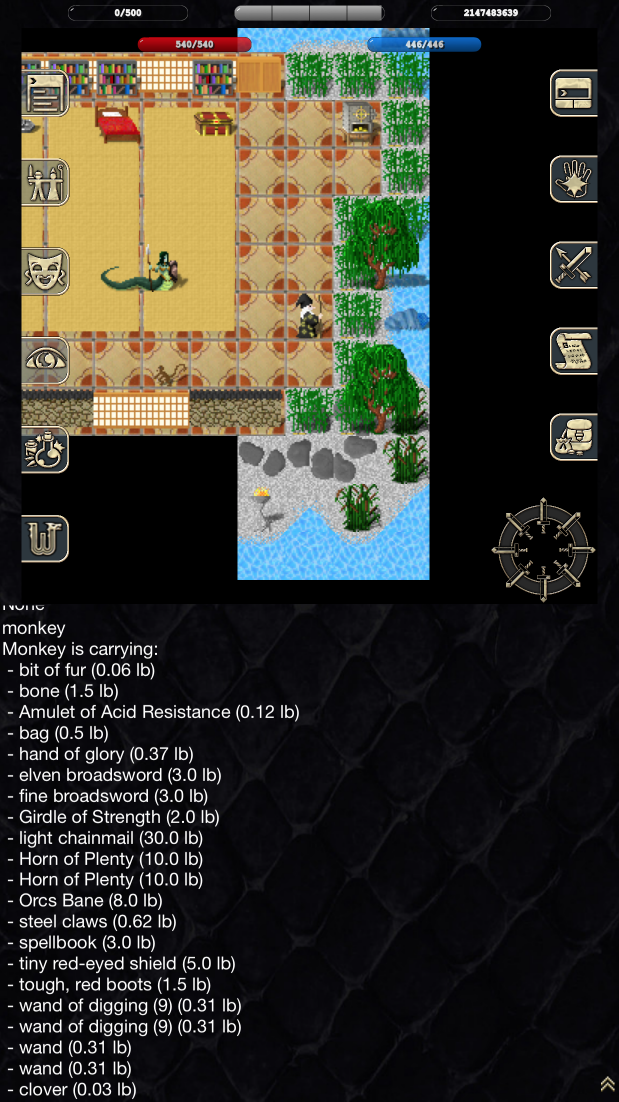
It's been a while! I took a couple of years off blogging because I felt I didn't have much left in the way of interesting things to say.  So I've been just been programming, and studying, and learning this and that.  I've been doing a bit of Cloud development, and I taught myself iOS development, and after years in the Google cocoon I poked my head out and learned how people do things in the real world with open source technologies. And lo at long last, after some five years of tinkering, I finally have something kind of interesting to share.  I wrote a game!  Well, to be more precise, I took an old game that I wrote, which I've perhaps mentioned once or twice before, and I turned it into a mobile game, with a Cloud backend. It has been waaaay more work than I expected. Starting with a more-or-less working game, and tweaking it to work on Cloud and mobile -- I mean, come on, how hard can it be, really?  Turns out, yeah, yep, very hard. Stupidly hard. Especially ...